1
2
3
4
5
6
7
8
9
10
11
12
13
14
15
16
17
18
19
20
21
22
23
24
25
26
27
28
29
30
31
32
33
34
35
36
37
38
39
40
41
42
43
44
45
46
47
48
49
50
51
52
53
54
55
56
57
58
59
60
61
62
63
64
65
66
67
68
69
70
71
72
73
74
75
76
77
78
79
80
81
82
83
84
85
86
87
88
89
90
91
92
93
94
95
96
97
98
99
100
101
102
103
104
105
106
107
108
109
110
111
|
#include <stdio.h>
#include "qrencode.h"  //二维码库的头文件
#include <string.h>
#include <stdlib.h>
#pragma pack(1) //字节对齐

//编译gcc qrencode_bmp.c -o qrencode_bmp -L/home/ubuntu/code/qrencode-4.1.1/_install/lib -lqrencode


typedef struct BITMAPFILEHEADER /* size: 14 */
{
   unsigned char bfType[2];        	// 文件的类型,也就是字符'BM'。
   unsigned int  bfSize;        	// 位图文件的大小,用字节为单位
   unsigned short bfReserved1;		// 保留,必须设置为0
   unsigned short bfReserved2;		// 保留,必须设置为0
   unsigned int  bfOffBits;			// 位图数据距离文件开头偏移量,用字节为单位
} BMPFILEHEADER;


typedef struct BITMAPINFOHEADER  /* size: 40 */
{
   unsigned int  biSize;             // BITMAPINFOHEADER结构所需要的字数
   unsigned int  Width;              // 图像宽度,单位为像素
   unsigned int  Height;             // 图像高度,单位为像素,负数,则说明图像是正向的
   unsigned short biPlanes;          // 为目标设备说明位面数,其值将总是被设为1
   unsigned short biBitCount;        // 一个像素占用的bit位,值位1、4、8、16、24、32
   unsigned int  biCompression;      // 压缩类型
   unsigned int  biSizeImage;        // 位图数据的大小,以字节为单位
   unsigned int  biXPelsPerMeter;    // 水平分辨率,单位 像素/米
   unsigned int  biYPelsPerMeter;    // 垂直分辨率,单位 像素/米
   unsigned int  biClrUsed;          // 当该字段设置为 0 时,颜色表中的颜色数量基于 biBitCount 字段(1 表示 2 种颜色,4 表示 16 种,8 表示 256 种,24 表示无颜色表)。
   unsigned int  biClrImportant;     // 指定颜色表的前 x 颜色对 DIB 很重要。如果其余颜色不可用,图像仍然以可接受的方式保留其含义。
} BMPINFOHEADER;

#pragma pack() //取消字节对齐


int main (int argc ,char *argv[]){

    int width = 0;
    int hight = 0;

    //进行编码
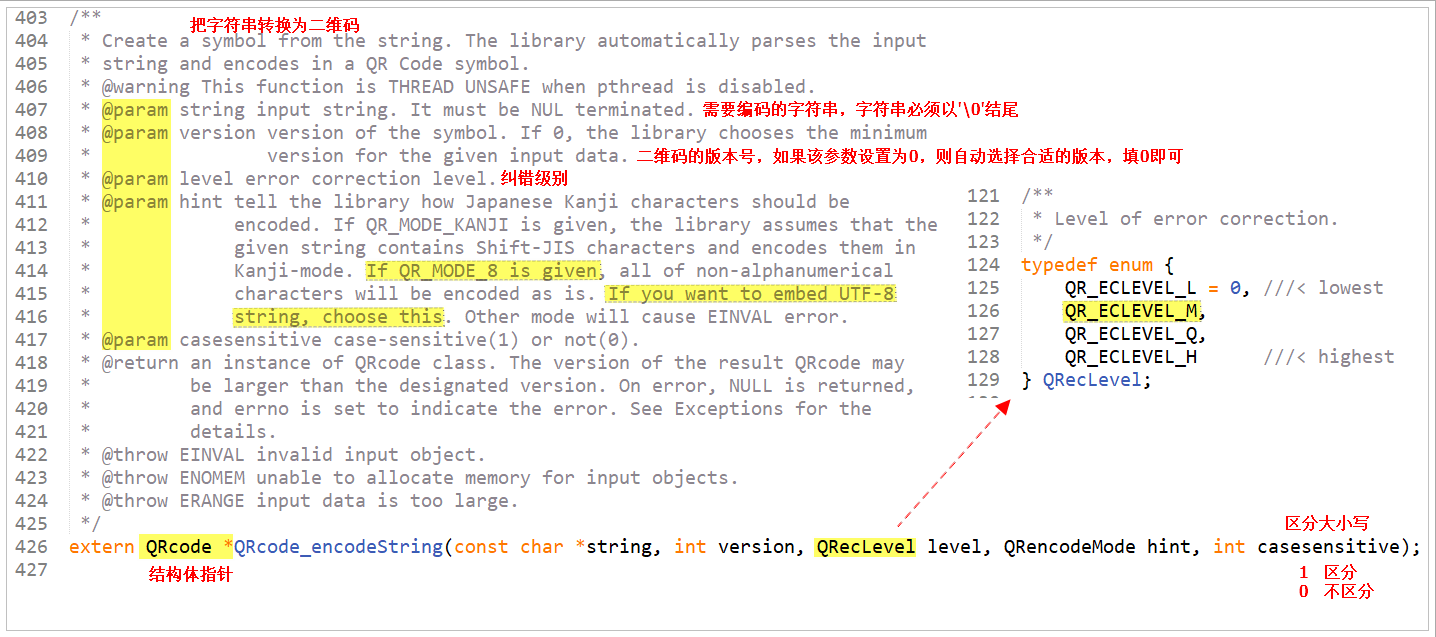
    QRcode *qrcode = QRcode_encodeString("https://blog.guokun.net", 0, QR_ECLEVEL_M, QR_MODE_8, 1);
    if (!qrcode) {
        fprintf(stderr, "Failed to encode QR code\n");
        return 1;
    }

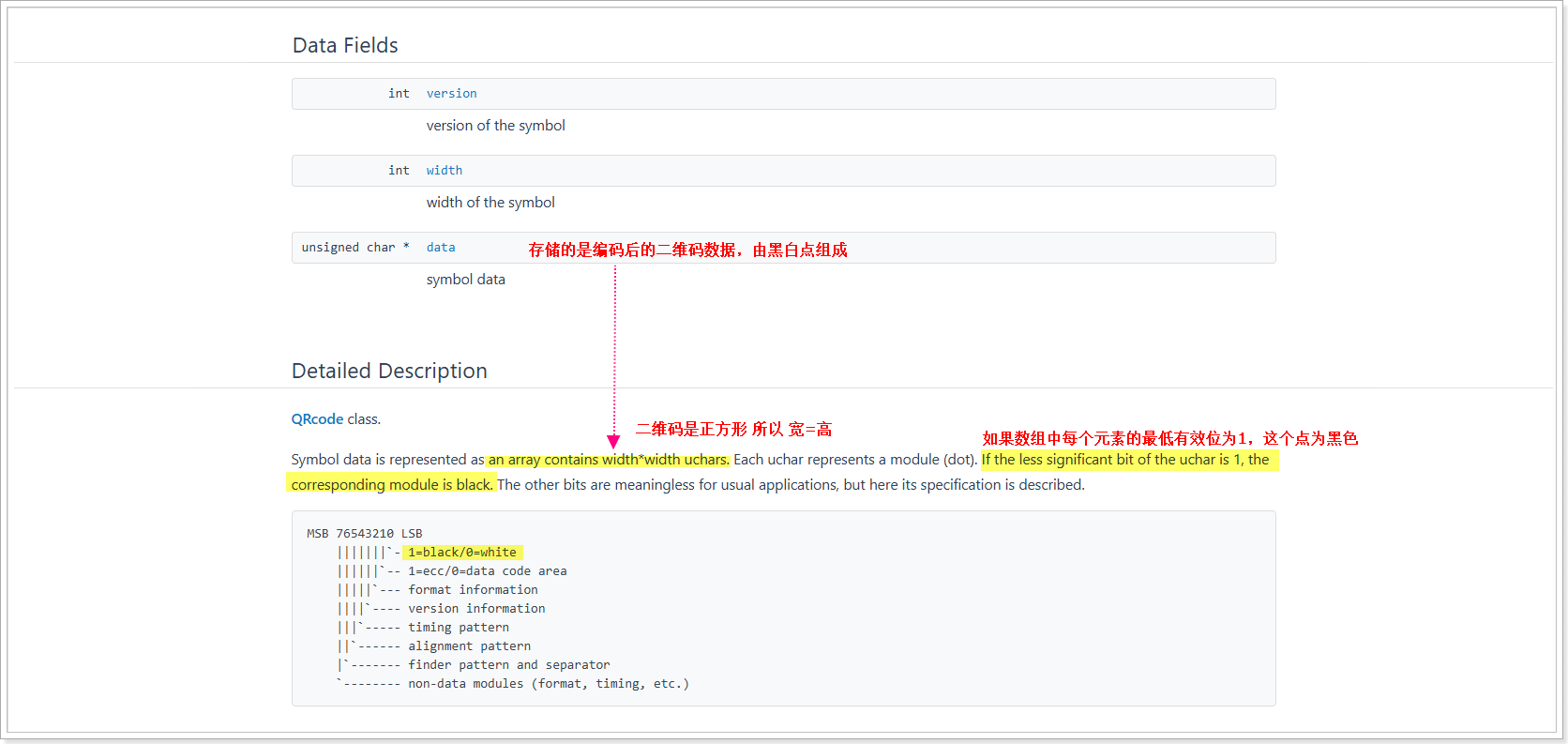
    printf("version : %d",qrcode->version);
    printf("Width : %d",qrcode->width);

    width = qrcode->width;
    hight = qrcode->width;

    //2.创建bmp图片,并设置bmp图片的头部信息(54字节)
	FILE * bmp_fp = fopen("qrcode.bmp","wb");

	BMPFILEHEADER bmp_fileheader; //存储文件头  14字节
	BMPINFOHEADER bmp_infoheader; //存储信息头  40字节

    int line_size = width*24 / 8 +  (4 - (width*3%4) ) % 4; //BMP图片每行必须是4的倍数。以字节为单位  == 图片宽度 * 像素色深 / 8 + 需要补齐的字节数
    printf("line size = %d",line_size);

    bmp_fileheader.bfType[0] = 0X42;
    bmp_fileheader.bfType[1] = 0X4D;
    bmp_fileheader.bfSize = line_size * hight + 54; //图像大小,以字节为单位
    bmp_fileheader.bfReserved1 = 0;
    bmp_fileheader.bfReserved2 = 0;
    bmp_fileheader.bfOffBits = 54;

    bmp_infoheader.biSize = 40;
    bmp_infoheader.Width = width;
    bmp_infoheader.Height = hight;
    bmp_infoheader.biPlanes = 1;
    bmp_infoheader.biBitCount = 24;
    bmp_infoheader.biCompression = 0;
    bmp_infoheader.biSizeImage = line_size * hight;
	bmp_infoheader.biXPelsPerMeter =0;
	bmp_infoheader.biYPelsPerMeter =0;
	bmp_infoheader.biClrUsed       =0;
	bmp_infoheader.biClrImportant  =0;

    //3.将bmp图片的头部信息写入文件
    fwrite(&bmp_fileheader, sizeof(BMPFILEHEADER), 1, bmp_fp);
    fwrite(&bmp_infoheader, sizeof(BMPINFOHEADER), 1, bmp_fp);

    //4.将二维码图像数据写入文件

    unsigned char * buf = calloc(1,line_size* hight);

	memset(buf,0xFF,line_size* hight);  //相当于缓冲区中每个字节都是0xFF,由于该缓冲区是为了存储二维码颜色分量的 所以R=0xFF G=0xFF  B=0xFF  所以背景是白色

    for(int y = 0; y < hight; y++) {
        for(int x = 0; x < width; x++) {
            if(qrcode->data[y * width + x] & 1) {
                buf[(hight-1-y) * line_size + (x * 3) + 0] = 0; // B
                buf[(hight-1-y) * line_size + (x * 3) + 1] = 0; // G
                buf[(hight-1-y) * line_size + (x * 3) + 2] = 0; // R
            }
        }

    }

    fwrite(buf, 1, line_size * hight, bmp_fp);

    fclose(bmp_fp);
    return 0;
}
|